Project Management & Organization
How do I duplicate or clone an existing project?
Learn how to duplicate or clone an existing project.
How do I duplicate or clone an existing project?
What is Project Cloning?
Project cloning allows you to create an exact copy of an existing project. This is perfect when you want to reuse a project's structure, design, or functionality while making modifications without affecting your original work.
Step-by-Step Guide:
1. Access Your Project History
- Log in to your Greta account
- On the left-hand side panel, you'll see your Project History section
- This area lists all your previous and current projects
2. Select Project to Clone
- Browse through your project history
- Identify the project you want to duplicate
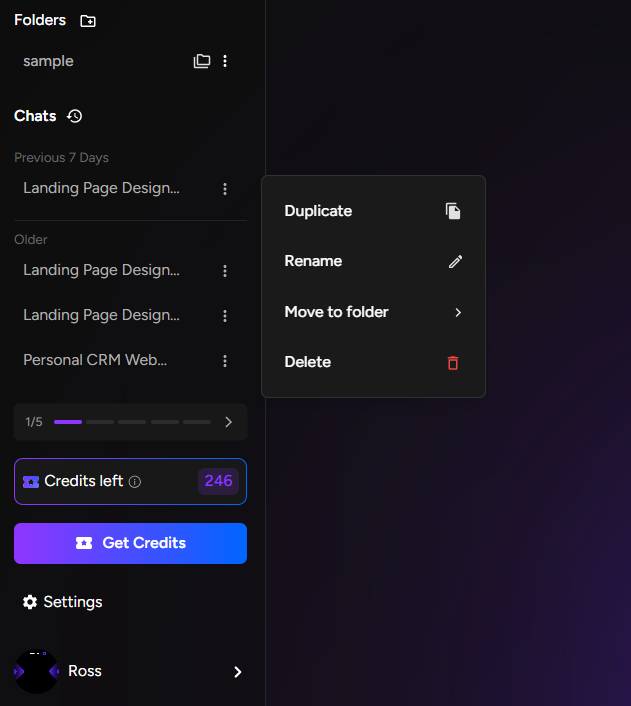
- Locate the three-dot menu (⋯) next to the project name
3. Initiate Cloning Process
- Click the three-dot menu to open options
- You'll see two options: Duplicate and Delete
- Select Duplicate to begin cloning
4. Completion and Access
- A new copy of your project is instantly created
- The cloned project automatically appears in your project history
- You'll see the new project listed alongside your original
5. Work with Your Clone
- Open the cloned project by clicking on it
- Make any changes, edits, or customizations
- All modifications happen independently without affecting the original project
When to Use Project Cloning:
- Experiment with new features risk-free
- Use successful projects as templates for new work
- Test different design variations
- Create backups before major changes
Key Benefits:
- Saves time by reusing proven project structures
- Maintains original project integrity
- Enables safe experimentation
- Perfect for iterative design and development