Build an Admin Panel Your Ops Team Actually Uses
Describe the internal tool you need in plain English. Greta.sh builds a working admin panel — user tables, moderation queues, refund flows, role-based access — that you can test the same day and ship to production. No engineers, no sprint queue, no six weeks of Retool configuration.
The Problem
Why founders end up stuck on internal tools
Every growing startup hits the same wall. Your ops team is running the business out of a spreadsheet and three browser tabs. Support can't look up an account without pinging an engineer. Finance issues refunds by writing SQL. Everyone knows they need a real admin panel — but building one always loses the priority fight to customer-facing features.
So the internal tool never gets built, or it gets half-built and abandoned. The traditional options don't help:
Hire it out to engineering
Admin tools are unglamorous, so they sit at the bottom of the sprint backlog for months.
Buy Retool or Forest Admin
Powerful, but you're now learning a platform, wiring up data sources, and configuring permissions for weeks before anything works — and someone has to keep maintaining it.
Extend a no-code website builder
These were built for marketing sites. The moment you need a real data table with filters, bulk actions, and role permissions, you hit the ceiling.
The problem isn't your team's ability. It's that internal tooling has never had a fast path from "here's what ops needs" to "here's a working tool."
How Greta.sh Is Different
How Greta.sh is different
You describe the admin panel you need — who uses it, what they do, what data it touches. Greta.sh generates a working interface with the pieces internal tools actually require: searchable data tables, edit and bulk-action controls, approval workflows, role-based access, and audit logs. Not a static mockup — a real, interactive tool your team can use the same day.
And because Greta.sh generates its own database and Python APIs, you get a complete, working application — not just a UI you still have to connect to a backend. The difference from the usual options:
vs. Retool / Forest Admin
Those tools are mainly front-ends you wire to data you already run. Retool also offers a managed PostgreSQL database (Retool Database) and a newer AI app builder that generates an app from a prompt, though in its traditional editor you still assemble the tool yourself. Greta.sh builds the whole thing from your description: database, APIs, and interface. No data-source setup, no dedicated operator, no platform to learn first.
vs. a custom Django/Rails admin
No engineering time spent on internal screens nobody outside the company sees. Greta.sh ships a full-stack tool with its own backend, so you're not pulling engineers off the product roadmap.
vs. a generic no-code builder
Built for internal tools specifically, so tables, permissions, and workflows are first-class — not something you fake with generic components.
How To Build
Build one, step by step
Describe it.
Tell Greta.sh who the users are (super admins, support agents, finance, moderators) and what each needs to do. Plain English.
Watch it build.
Greta.sh generates the screens, tables, and flows live — tailored to an internal tool, not a generic template.
Refine it.
Adjust layouts, add sections, change permissions. Each change takes minutes.
Test with your team.
Share a link. Your ops staff use it on real tasks and tell you what’s missing — no deployment pipeline in the way.
Ship to production.
Greta.sh generates the backend too — its own database and Python APIs — and deploys your admin panel to a live URL. It's a real, running application, not a prototype you have to hand to engineering to make functional.
Use Cases
What people build with Greta.sh
User management
Search, filter, edit, suspend, and run bulk actions across your user base.
Content moderation
An approve / reject / escalate queue for user-generated content.
Order management
Track orders, update status, issue refunds, manage fulfillment.
Finance ops
Transaction history, reconciliation, and export tools.
Support console
Customer lookup, account history, and account actions for your support team.
Analytics admin
Custom metrics, date ranges, and exports for internal reporting.
Comparison
Greta.sh vs. Retool vs. Forest Admin
Retool and Forest Admin are built mainly as front-ends over data you already run (Retool also offers a managed PostgreSQL database, Retool Database, and an AI app builder that generates an app from a prompt); Greta.sh builds the full stack. If you specifically need a UI on top of your existing production database, that's their model, not Greta.sh's: see the Django/Rails question below for the honest trade-off.
A Real Example
A real example
Here's an admin panel built in Greta.sh from a single prompt:
"create an admin panel for me — a user table, a moderation queue, something with rows and controls."
That's the entire instruction. Greta.sh returned a working AdminPanel with a Users table (name, email, role, status, and join date), role badges distinguishing admins from regular users, active/inactive status, an Add User action, a global search bar, and separate Moderation and Settings sections in the sidebar — signed in as a Super Admin, so role-based access is there out of the box. It loaded cleanly on the first pass, no debugging round required.
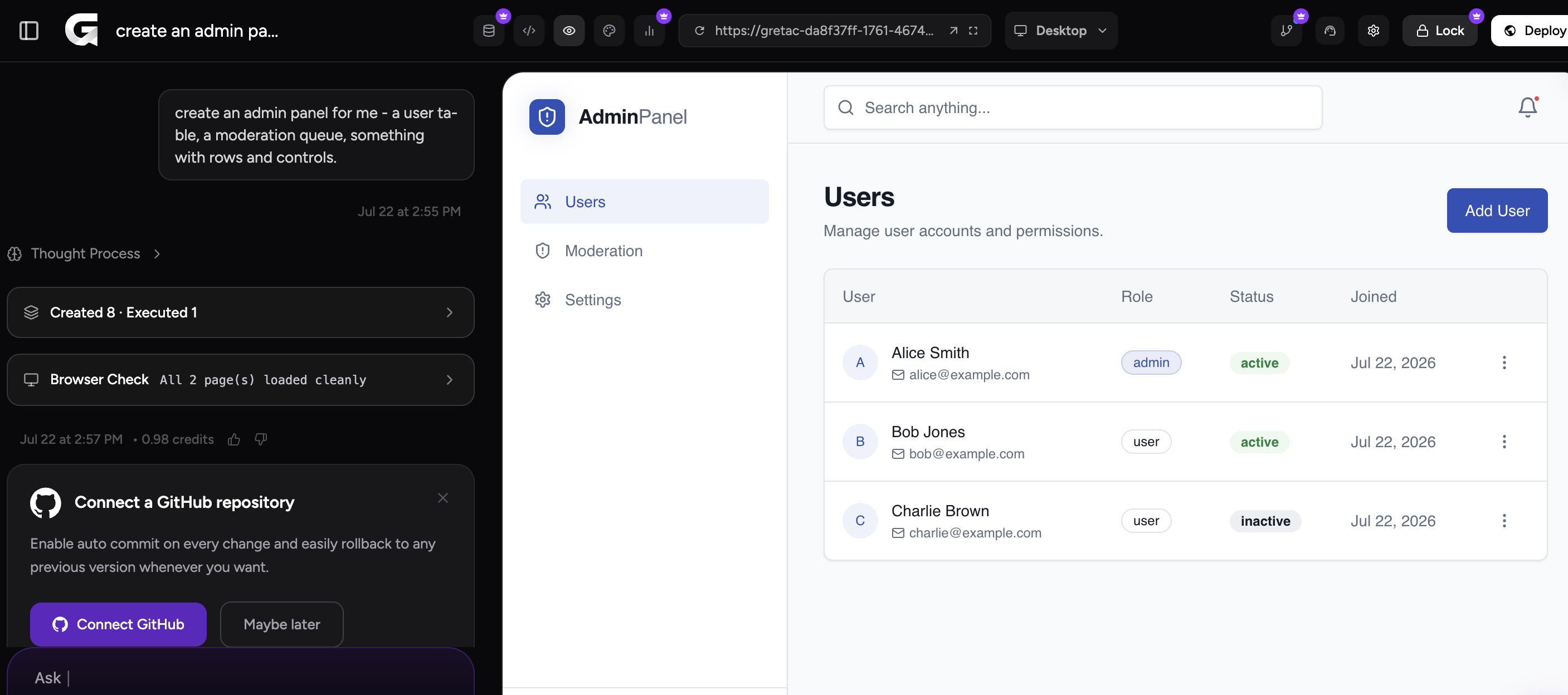
From here you'd refine in plain English — "add a bulk-suspend action," "give moderators a read-only view," "add a signups-this-week column" — and each change lands in minutes. That's the whole loop: describe, see it, refine, ship.
Templates
Start from a template
Don't start from a blank screen. Greta.sh's marketplace has admin-panel templates built and production-tested by other founders — working tools you can deploy and customize, not design mockups.
Browse Admin TemplatesFAQ
Frequently asked questions
Ready to build your admin panel?
Describe what your ops team needs and have a working tool today. No engineering team required.