Webflow vs Framer: power versus speed
Webflow vs Framer is power versus speed. Webflow gives you deep design control, a robust CMS, and code export — the choice for content-rich, complex marketing sites. Framer is faster and more intuitive, with AI-assisted design and a gentler learning curve — the choice for landing pages and quick, beautiful sites. Both are website builders, and both are cheap next to app platforms. If what you actually need is a web app with a backend rather than a website, that's a different category — where a full-stack AI builder like Greta.sh fits instead.
Webflow vs Framer: quick verdict
- Choose Webflow if you want maximum design control, a powerful CMS for content-heavy sites, and the ability to export code.
- Choose Framer if you want to design and launch a beautiful site fast, with a lower learning curve and strong AI design tools.
- Note: both build websites. If you need an app (logins, dashboards, data), see the last section.
Whether you search it as Webflow vs Framer, Framer vs Webflow, or Framer vs Webflow for websites, the trade-off is the same: Webflow's power vs Framer's speed.
How do Webflow and Framer compare at a glance?
| Webflow | Framer | |
|---|---|---|
| Best for | Content-rich, complex marketing sites | Fast, beautiful sites and landing pages |
| Learning curve | Steeper (more control) | Gentler (faster to design) |
| CMS | Robust (20,000 items on Premium) | Good, lighter |
| Code export | Yes (HTML/CSS/JS) | No native code export |
| Free plan | Yes (Starter, webflow.io) | Yes (500 credits, framer subdomain) |
| Entry paid plan | Basic $25/mo | Basic $15/mo (1,000 credits) |
| Higher tier | Premium $39/mo | Pro $45/mo (3,000 credits), Enterprise custom |
| Model / seats | Flat plan + seats (Full $39, Limited $15) | Credit-based; unlimited editors on Enterprise |
| Made by | Webflow | Framer |
Pricing from each vendor's live pricing page, July 2026, confirmed in USD directly.
Got an idea? Build it now!
Just start with a simple prompt. No coding required: Greta.sh turns your idea into a working app in minutes.
What is Webflow best at?
Webflow is best at building powerful, content-rich websites with precise design control. Its visual canvas maps to real HTML/CSS, its CMS is robust (Premium includes 20,000 CMS items), and you can export the front-end code. After a May 2026 simplification, Site plans are Starter (free), Basic ($25/mo), and Premium ($39/mo, which merged the old CMS and Business plans), with per-seat Workspace costs (Full $39/mo, Limited $15/mo) and Enterprise/Team options above. Its strength is depth and control for complex sites; its limitation is a steeper learning curve and seat costs that add up for teams.
What is Framer best at?
Framer is best at designing and launching beautiful sites quickly. It feels closer to a design tool, has strong AI-assisted design features, and gets you from idea to a live, polished site with a gentler learning curve than Webflow. Pricing is credit-based, in USD: a free tier (500 credits, Framer subdomain), Basic at $15/month (1,000 credits/month, custom domain, 2 CMS collections, 50 GB bandwidth, built-in SEO), and Pro at $45/month (3,000 credits/month, adding 10 CMS collections, 100 GB, staging, and branching), with Enterprise custom above; an additional editor seat is $30/month. Its strength is speed and ease for landing pages and marketing sites; its limitation is a lighter CMS than Webflow and no native code export, so it's less suited to very complex or content-heavy builds.
Webflow vs Framer: pricing compared
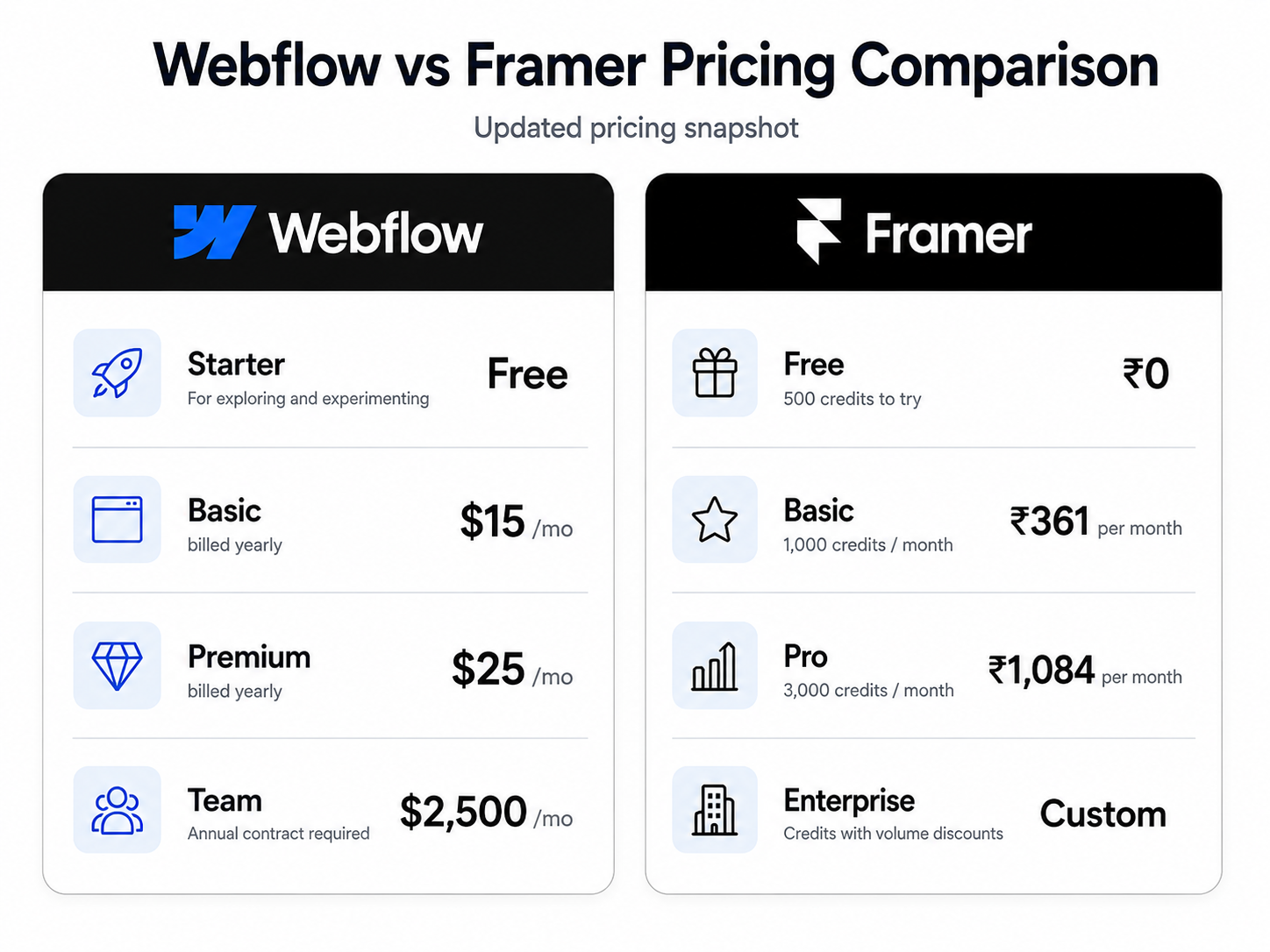
At entry, Framer's Basic ($15/month) still undercuts Webflow's Basic ($25/month), so for a single solo site Framer is the cheaper start. But the gap closes — and reverses — at the next tier: Framer Pro is $45/month versus Webflow Premium at $39/month, so Webflow is actually the cheaper of the two once you need a real CMS. The usage models also differ: Webflow adds per-seat costs ($39/month per full seat) on top of the site plan, so a team's real bill is plan + seats, while Framer meters credits (500 free, 1,000 on Basic, 3,000 on Pro), so your real cost depends on how much you build and how many editors you add ($30/month per extra seat). For a single small site, Framer is cheaper; for a content-heavy site or once you need Pro-tier features, Webflow is the better value.
Got an idea? Build it now!
Just start with a simple prompt. No coding required: Greta.sh turns your idea into a working app in minutes.
Which should you choose — and what if you need an app, not a site?
For a website, choose Webflow if you need power, a big CMS, and code export; choose Framer if you want speed, ease, and strong AI design. But be clear about the category: both build websites, not applications. If what you actually need has logins, dashboards, user data, or app logic, a website builder is the wrong tool — that's an app-builder job. A full-stack AI builder like Greta.sh generates the frontend, backend, database, and deployment from plain English, which is a different category from Webflow and Framer. If you're weighing a site vs an app, see Greta.sh vs Webflow and Greta.sh vs Framer. Choose Webflow if you want structured, scalable marketing sites, and Framer for fast and visually polished landing pages.
Frequently asked questions
Is Framer better than Webflow? Neither is better overall — it depends on the site. Framer is better for fast, beautiful sites and landing pages with an easier learning curve. Webflow is better for complex, content-rich sites that need a powerful CMS and code export. Framer wins on speed; Webflow wins on depth.
Is Webflow or Framer cheaper? It depends on the tier. Framer's Basic ($15/month) is cheaper than Webflow's Basic ($25/month), but Framer's Pro ($45/month) is actually more expensive than Webflow's Premium ($39/month). Webflow also adds per-seat costs ($39/month per full seat) on top, while Framer is credit-based (500 free credits, 1,000 on Basic, 3,000 on Pro) plus $30/month per extra editor seat. For a small solo site, Framer wins on price; once you need a real CMS, Webflow usually does.
Does Webflow or Framer have a better CMS? Webflow's CMS is more powerful — its Premium plan includes 20,000 CMS items and advanced structure, making it the stronger choice for blogs, directories, and content-heavy sites. Framer's CMS is capable and easier to use but lighter, which suits smaller sites.
Can you export code from Webflow or Framer? Webflow lets you export static front-end code (HTML/CSS/JS). Framer does not offer native code export. If owning and reusing your code matters, that's a point in Webflow's favor.
Can Webflow or Framer build a web app? Not really — both are website builders, not app platforms. They're excellent for marketing sites, portfolios, and landing pages, but for an app with logins, dashboards, and data you need an app builder. A full-stack AI builder like Greta.sh handles that category instead.
Need an app, not just a website? Build full-stack from a prompt → Try Greta.sh free
Greta.sh vs Webflow · Greta.sh vs Framer · Bubble vs Webflow · All comparisons
Last updated: July 26, 2026. Pricing/features from each vendor's live pricing page on this date; confirm before relying on it.