Bolt.new vs Cursor: browser app builder or AI code editor?
Bolt.new vs Cursor is another cross-category comparison. Bolt.new is a no-code AI app builder that runs your app in the browser via WebContainers and generates a full-stack project from a prompt — no code-reading required. Cursor is an AI-native code editor for developers who already write software, accelerating real engineering work inside an existing codebase. Choose Bolt if you want a working app without touching code. Choose Cursor if you're a developer who wants to move faster in your own workflow. If you want a no-code builder that also bundles the growth surface around the app, Greta is worth a look.
Bolt.new vs Cursor: quick verdict
- Choose Bolt.new if you don't code and want a full-stack app generated in the browser from a prompt, with fast, near-instant previews.
- Choose Cursor if you're a developer who wants deep codebase understanding and multi-file editing inside your existing project.
- Consider Greta if you're non-technical and also want domain, SEO, and analytics tooling bundled with the app builder.
Whether you search it as Bolt.new vs Cursor or Cursor vs Bolt, the real distinction is no-code builder versus developer tool.
How do Bolt.new and Cursor compare at a glance?
| Bolt.new | Cursor | |
|---|---|---|
| Category | No-code AI app builder | AI-native code editor |
| Who it's for | People who don't code | People who already code |
| Where you work | Browser (WebContainers) | A full code editor (VS Code-based) |
| Output | A complete, running full-stack app | Edits inside your existing codebase |
| Standout feature | Best-in-class Figma-to-code import | Deep codebase understanding, multi-file editing |
| Free plan | Yes (1M tokens/mo) | Yes (limited AI completions) |
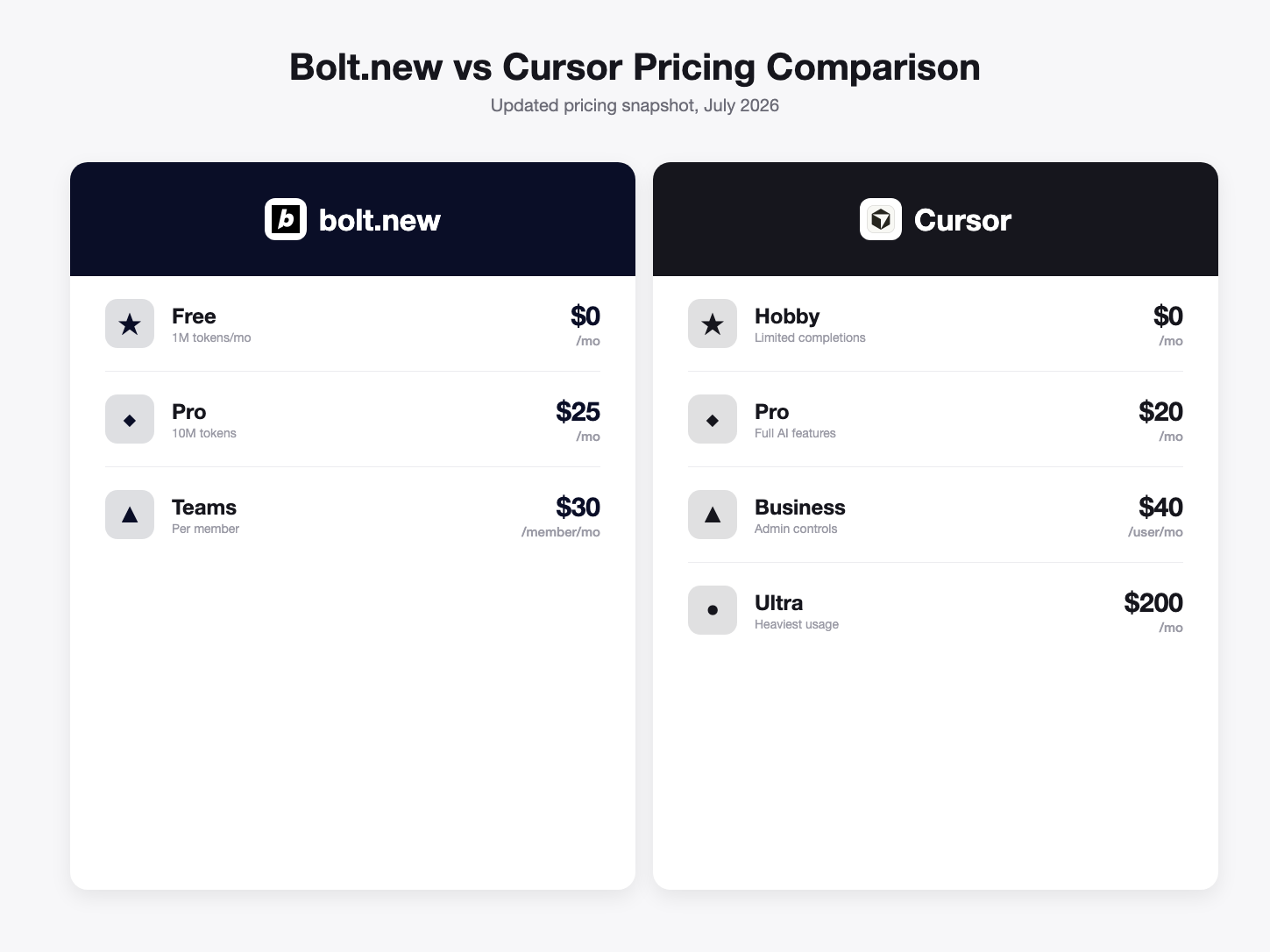
| Entry paid plan | Pro $25/mo | Pro $20/mo |
| Higher tier | Teams $30/member/mo | Business $40/user/mo, Ultra $200/mo |
| Code reading required | No | Yes |
Pricing from each vendor's live pricing page, July 2026; verify before relying on it.
Got an idea? Build it now!
Just start with a simple Prompt. No coding required — Greta turns your idea into a working app in minutes.
What is Bolt.new best at?
Bolt.new is best at generating a complete full-stack app for people who don't write code, directly in the browser. Its WebContainers architecture runs a real Node.js environment client-side, so previews update near-instantly as the AI generates code — and its Figma import is the strongest in the no-code category, turning an existing design file into working components. Pricing: a free tier (1M tokens/month) and Pro at $25/month, with Teams at $30/member/month; billing is token-based. Its strength is speed and design-led workflows without needing to read code; its limitation is that, like any no-code tool, deep customization past what the AI generates usually means bringing in a developer.
What is Cursor best at?
Cursor is best at making an already-skilled developer faster inside their own codebase. It's a full AI-native editor with deep codebase understanding and multi-file editing (Composer), built for developers working on complex, established projects with real frontend-backend coordination. Pricing: a free tier with limited AI completions, Pro at $20/month, Business at $40/user/month, and Ultra at $200/month for heavy usage. Its strength is speeding up real engineering work without taking control away from the developer; its limitation is that it assumes coding skill from the start — it's not built for someone with no technical background.
Bolt.new vs Cursor: pricing compared
Cursor Pro at $20/month is slightly cheaper at entry than Bolt Pro at $25/month, but the pricing models reflect entirely different products. Bolt bills by tokens consumed generating a full-stack app from scratch; Cursor bills by a developer's ongoing usage accelerating work inside an existing project, scaling up to $200/month for the heaviest individual users on Ultra. Comparing the numbers only makes sense once you've decided which category you actually need — a no-code app builder or a developer's code editor.
Got an idea? Build it now!
Just start with a simple Prompt. No coding required — Greta turns your idea into a working app in minutes.
Bolt.new vs Cursor by use case
| Use case | Better choice | Why |
|---|---|---|
| Non-coder shipping an app from a Figma file | Bolt.new | Best-in-class Figma import plus near-instant preview loop. |
| Developer extending a large, established codebase | Cursor | Deep codebase understanding and multi-file editing. |
| Fast prototype with no technical background | Bolt.new | Full-stack app generated directly in the browser. |
| Engineering team moving faster on real work | Cursor | Accelerates developers without replacing their judgment. |
| Handoff from prototype to production engineering | Both, in sequence | Ship v1 in Bolt, extend the exported code in Cursor. |
Which should you choose: Bolt.new or Cursor?
The deciding question is the same as any no-code-vs-coding-assistant comparison: do you already write code? If you're a non-coder who wants a real app, especially starting from a Figma design, Bolt.new is built for exactly that. If you're a developer who wants to move faster inside your existing editor, Cursor accelerates real engineering work rather than replacing it. See Greta vs Bolt.new for the no-code side in more depth, or AI Coding Assistants vs AI App Builders for the fuller category breakdown.
Frequently asked questions
Is Bolt.new better than Cursor? They're not really comparable — Bolt.new is a no-code app builder for people who don't write code; Cursor is a code editor for people who do. Which is "better" depends entirely on which one you are.
Can a developer use Bolt.new, or a non-coder use Cursor? A developer can use Bolt.new to prototype fast, especially from a Figma file. A non-coder using Cursor is a poor fit — it assumes you can read and evaluate the code it suggests.
Is Bolt.new or Cursor cheaper? Entry pricing is close: Cursor Pro is $20/month, Bolt Pro is $25/month. Cursor scales up to $200/month for heavy individual usage on Ultra; Bolt's Teams plan is $30/member/month.
Do I need to know how to code to use either? No for Bolt.new — it's built specifically so you don't need to. Yes for Cursor — it's an editor that assumes you can read, evaluate, and take responsibility for the code it suggests.
What if I'm non-technical but want more than just an app builder? Greta covers similar no-code ground to Bolt.new but bundles growth tooling (domain, SEO, analytics, content) into the same workspace, for founders who want the business surface handled alongside the app itself.
Prefer not to touch code? Build a full-stack app from a prompt → Try Greta free
Greta vs Bolt.new · Greta vs Cursor · AI Coding Assistants vs AI App Builders · All comparisons
Last updated: July 30, 2026. Pricing/features from each vendor's live pricing page on this date; confirm before relying on it.