Cursor vs GitHub Copilot: AI-native editor or the incumbent everywhere?
Cursor vs GitHub Copilot is a full AI-native editor versus the most widely adopted AI coding tool, deeply embedded in the editors developers already use. Cursor is built on VS Code with deep codebase understanding and multi-file editing (Composer), designed around AI-first workflows. GitHub Copilot integrates into VS Code, JetBrains, Neovim, and Visual Studio without requiring you to switch editors, and its scale (roughly 42% market share among paid tools, 1.8 million paying subscribers) makes it the lowest-friction default for most teams. Choose Cursor for the deepest AI-native editing experience. Choose Copilot if you want AI assistance inside the editor you already use, at the widest organizational scale.
Cursor vs GitHub Copilot: quick verdict
- Choose Cursor if you want the most capable AI-native editing experience — deep codebase understanding and multi-file editing — and don't mind adopting a new editor.
- Choose GitHub Copilot if you want to stay in your existing editor (VS Code, JetBrains, Neovim, Visual Studio) with the most widely adopted tool in the category.
- Consider Greta.sh if you're non-technical and want a full app generated from a description rather than assistance inside code you write yourself.
Whether you search it as Cursor vs Copilot or Copilot vs Cursor, the real distinction is a purpose-built AI editor versus the incumbent that meets you where you already work.
How do Cursor and GitHub Copilot compare at a glance?
| Cursor | GitHub Copilot | |
|---|---|---|
| Best for | Deepest AI-native editing experience | Lowest-friction option inside your existing editor |
| Type | Standalone AI-native editor (VS Code-based) | Plugin/extension across multiple editors |
| Editor support | Its own editor only | VS Code, JetBrains, Neovim, Visual Studio |
| Market position | Fast-growing AI-native challenger | ~42% market share, 1.8M paying subscribers |
| Free plan | Yes (limited completions) | Yes (limited completions and chat) |
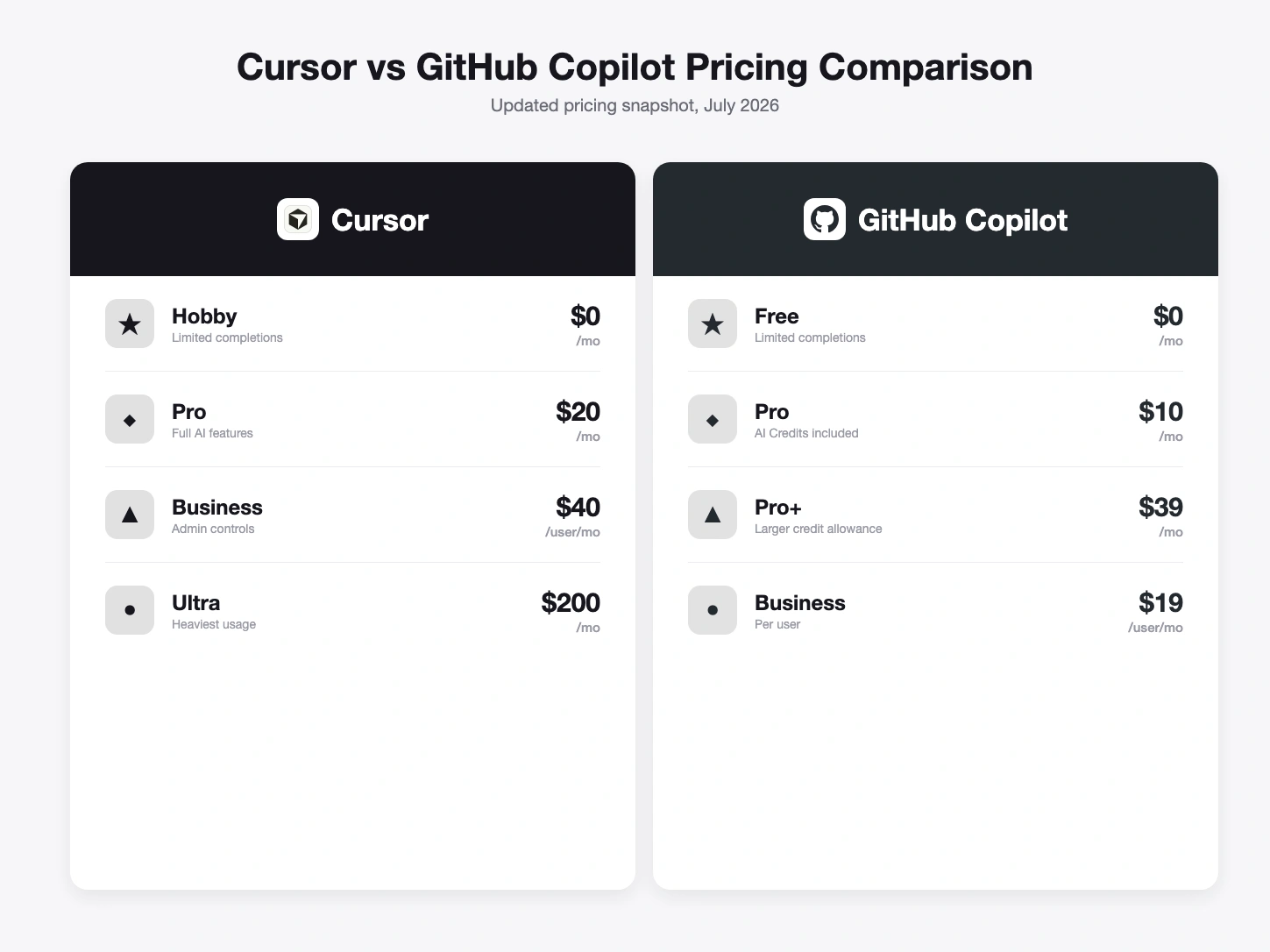
| Entry paid plan | Pro $20/mo | Pro $10/mo |
| Higher tiers | Business $40/user/mo, Ultra $200/mo | Pro+ $39/mo, Business $19/user/mo, Enterprise $39/user/mo |
| Billing model | Subscription tiers | AI Credits (token-based, since June 2026) |
Pricing from each vendor's live pricing page, July 2026; verify before relying on it.
Got an idea? Build it now!
Just start with a simple prompt. No coding required: Greta.sh turns your idea into a working app in minutes.
What is Cursor best at?
Cursor is best at the deepest possible AI-native editing experience for developers willing to adopt a new editor. Built on VS Code, it offers deep codebase understanding and multi-file editing through Composer, and performs reliably on complex, established projects with real frontend-backend coordination. Pricing: a free tier with limited completions, Pro at $20/month, Business at $40/user/month, and Ultra at $200/month for heavy usage. Its strength is editing depth and AI-native workflow design; its limitation is that it requires switching editors, which is real friction for teams standardized on something else.
What is GitHub Copilot best at?
GitHub Copilot is best at being the lowest-friction AI coding tool for teams already working in VS Code, JetBrains, Neovim, or Visual Studio — no new editor required. It remains the most widely adopted tool in the category, with roughly 42% market share among paid tools and 1.8 million paying subscribers. Pricing: Free, Pro at $10/month, Pro+ at $39/month, with organizational tiers at $19/user/month (Business) and $39/user/month (Enterprise); as of June 2026, all plans bill via AI Credits based on token usage, with code completions free on paid plans. Its strength is ubiquity and zero editor-switching cost; its limitation is that it's an assistant layered into your existing editor rather than a purpose-built AI-native environment.
Cursor vs GitHub Copilot: pricing compared
Copilot Pro at $10/month undercuts Cursor Pro at $20/month at the entry level, and Copilot's organizational tiers ($19-$39/user/month) are generally lower than Cursor Business at $40/user/month. Copilot's June 2026 shift to AI Credits billing means cost now tracks token usage more directly, similar in spirit to how many AI tools price consumption. Cursor's flat subscription tiers (up to $200/month on Ultra) are more predictable for the heaviest individual users. Neither pricing structure is inherently better — Copilot's lower entry cost reflects its incumbent scale; Cursor's higher price reflects a more specialized, AI-native product.
Got an idea? Build it now!
Just start with a simple prompt. No coding required: Greta.sh turns your idea into a working app in minutes.
Cursor vs GitHub Copilot by use case
| Use case | Better choice | Why |
|---|---|---|
| Deepest possible AI-native editing | Cursor | Purpose-built around Composer and multi-file AI editing. |
| Team standardized on VS Code or JetBrains | GitHub Copilot | No editor switch required, lowest organizational friction. |
| Large enterprise rollout | GitHub Copilot | Established Business/Enterprise tiers and massive existing adoption. |
| Solo developer wanting the newest AI-first workflow | Cursor | Built from the ground up around AI-assisted development. |
| Budget-conscious individual developer | GitHub Copilot | Pro tier at $10/month versus Cursor Pro at $20/month. |
Which should you choose: Cursor or GitHub Copilot?
If you want the most AI-native editing experience available and are willing to adopt a new editor, Cursor's depth on codebase understanding and multi-file editing is a real advantage. If you want to stay in your current editor with the tool that has the widest existing adoption and lowest switching cost, GitHub Copilot is the safer, more embedded choice. Both assume you already write code — for non-coders, see AI Coding Assistants vs AI App Builders for the category that actually fits.
Frequently asked questions
Is Cursor better than GitHub Copilot? Neither is strictly better — Cursor offers deeper AI-native editing if you're willing to switch editors. Copilot offers the lowest-friction AI assistance inside the editor you already use, at far larger scale.
Is Cursor or GitHub Copilot cheaper? Copilot Pro is $10/month versus Cursor Pro at $20/month, and Copilot's organizational tiers are generally lower too. Cursor's Ultra tier ($200/month) is for the heaviest individual usage.
Do I have to switch editors to use Cursor? Yes — Cursor is its own standalone editor (built on VS Code's foundation). Copilot works as a plugin inside editors you already use, including VS Code itself.
Which has more users? GitHub Copilot, by a wide margin — roughly 42% market share among paid AI coding tools and 1.8 million paying subscribers, reflecting its head start and GitHub's existing developer reach.
What if I don't write code at all? Neither tool is built for that — both assume you can read and evaluate the code they suggest. A no-code AI app builder like Greta.sh generates a full-stack app from a plain-English description instead.
Prefer not to touch code? Build a full-stack app from a prompt → Try Greta.sh free
AI Coding Assistants vs AI App Builders · All comparisons
Last updated: July 30, 2026. Pricing/features from each vendor's live pricing page on this date; confirm before relying on it.