Cursor vs Windsurf: deep codebase editing or fast, autonomous flow?
Cursor vs Windsurf is depth versus speed. Cursor is built around deep codebase understanding and multi-file editing (Composer), the pick for developers working on complex, established projects. Windsurf is known for speed and its autonomous Cascade mode, with daily and weekly quotas (as of a March 2026 pricing overhaul) rather than a single monthly pool to exhaust — a strong price-to-feature ratio for indie developers who want fast, largely autonomous iteration. Note: as of June 2026, Cognition (which acquired Windsurf in 2025) folded the product into its "Devin Desktop" line — windsurf.com's pricing page now redirects to Devin's, though the Windsurf editor and Cascade branding are still live as of this writing. Choose Cursor for the most reliable multi-file editing on complex codebases. Choose Windsurf for speed and autonomy at a competitive price.
Cursor vs Windsurf: quick verdict
- Choose Cursor if you're working on a complex, established codebase and want the most reliable multi-file editing and codebase understanding.
- Choose Windsurf if you want fast, largely autonomous iteration through Cascade mode, with strong price-to-feature value.
- Consider Greta.sh if you're non-technical and want a full app generated from a description rather than assistance inside code you write yourself.
Whether you search it as Cursor vs Windsurf or Windsurf vs Cursor, the real distinction is editing depth versus autonomous speed.
How do Cursor and Windsurf compare at a glance?
| Cursor | Windsurf | |
|---|---|---|
| Best for | Deep, reliable multi-file editing on complex projects | Fast, autonomous iteration via Cascade mode |
| Type | AI-native editor (VS Code-based) | AI-native editor with autonomous agent mode |
| Standout feature | Composer for multi-file editing | Cascade mode — daily/weekly quotas, no monthly pool to exhaust |
| Free plan | Yes (limited completions) | Yes (unlimited Tab autocomplete, ~25 Cascade actions/mo) |
| Entry paid plan | Pro $20/mo | Pro $20/mo |
| Higher tiers | Business $40/user/mo, Ultra $200/mo | Max $200/mo, Teams $80/mo + $40/user/mo, Enterprise custom |
| Notable pricing detail | Flat monthly tiers | March 2026 shift to daily/weekly quotas; brand folded into Cognition's Devin Desktop, June 2026 |
Pricing from each vendor's live pricing page, July 2026; verify before relying on it.
Got an idea? Build it now!
Just start with a simple prompt. No coding required: Greta.sh turns your idea into a working app in minutes.
What is Cursor best at?
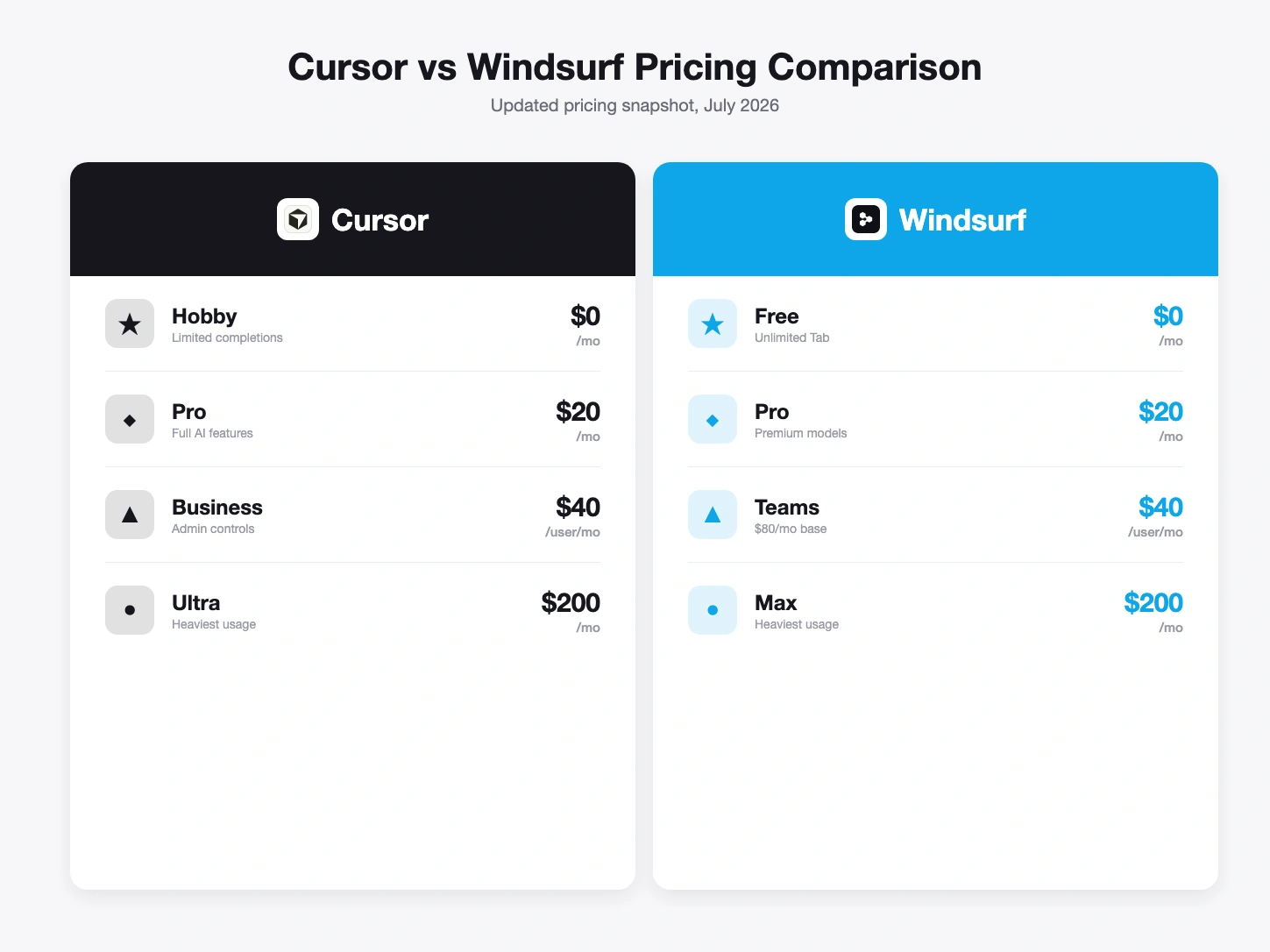
Cursor is best at deep, reliable editing on complex, established codebases. Its Composer feature handles multi-file edits with real codebase understanding, which matters most on projects with genuine frontend-backend coordination and architectural complexity. Pricing: a free tier with limited completions, Pro at $20/month, Business at $40/user/month, and Ultra at $200/month for heavy usage. Its strength is reliability and depth on complex work; its limitation is that it's less focused on autonomous, hands-off iteration than Windsurf's Cascade mode.
What is Windsurf best at?
Windsurf is best at fast, largely autonomous iteration through its Cascade mode, with a March 2026 pricing overhaul that replaced monthly credit pools with daily and weekly quotas that refresh automatically. Pricing: a free tier (unlimited Tab autocomplete, light daily quota), Pro at $20/month (full frontier model access and cloud agents), Max at $200/month (significantly higher quotas), Teams at $80/month plus $40/user/month, and custom Enterprise pricing with compliance certifications (SAML/OIDC SSO). As of June 2026, Cognition — which acquired Windsurf in 2025 — folded it into the "Devin Desktop" product line; windsurf.com/pricing now redirects to Devin's pricing page, so treat "Windsurf" as a brand in transition rather than a fully independent product going forward. Its strength is speed and autonomy at a strong price-to-feature ratio, especially for indie developers; its limitation is that autonomous iteration trades some of the fine-grained control Cursor's Composer offers on genuinely complex, multi-file changes.
Cursor vs Windsurf: pricing compared
Entry pricing is identical — both Pro tiers are $20/month — so the real comparison is about what each subscription actually buys. Windsurf's March 2026 shift to daily/weekly quotas (rather than a single monthly pool) changes the practical experience of hitting limits: you're less likely to exhaust a whole month's allowance in one heavy session, since quotas refresh more frequently. Cursor's Ultra ($200/month) and Windsurf's Max ($200/month) are priced identically at the top end, both aimed at the heaviest individual users. At the team tier, the structures diverge: Windsurf Teams is a $80/month base plus $40/user/month, while Cursor Business is a flat $40/user/month with no base fee — so Windsurf Teams costs more than Cursor Business until a team is reasonably large.
Got an idea? Build it now!
Just start with a simple prompt. No coding required: Greta.sh turns your idea into a working app in minutes.
Cursor vs Windsurf by use case
| Use case | Better choice | Why |
|---|---|---|
| Complex, established codebase with real architecture | Cursor | Composer's multi-file editing is built for exactly this. |
| Fast, largely autonomous iteration | Windsurf | Cascade mode is designed around autonomy and speed. |
| Indie developer wanting strong price-to-feature value | Windsurf | Daily/weekly quotas plus premium model access at $20/month. |
| Enterprise rollout with compliance requirements | Windsurf | Enterprise tier includes SAML/OIDC SSO and custom compliance terms; confirm current certifications directly given the June 2026 Devin Desktop transition. |
| Heaviest individual usage, either tool | Tie | Both top out at $200/month (Ultra vs Max) for power users. |
Which should you choose: Cursor or Windsurf?
If your work is on a complex, established codebase where reliable multi-file editing matters most, Cursor's Composer has the deeper track record. If you want fast, autonomous iteration with a strong price-to-feature ratio and don't mind trading some fine-grained control for speed, Windsurf's Cascade mode is built for that. Both assume you already write code — for non-coders, see AI Coding Assistants vs AI App Builders for the category that actually fits.
Frequently asked questions
Is Cursor better than Windsurf? Neither is strictly better — Cursor is stronger for deep, reliable multi-file editing on complex projects. Windsurf is stronger for fast, autonomous iteration at a similar price point.
Is Cursor or Windsurf cheaper? Entry pricing is identical: both Pro tiers are $20/month. The difference is in what you get for it — Cursor's editing depth versus Windsurf's autonomous Cascade mode and daily/weekly quota structure.
What changed with Windsurf's pricing in March 2026? Windsurf moved from a single monthly credit pool to daily and weekly quotas that refresh automatically, reducing the risk of exhausting a whole month's allowance in one heavy session.
Which is better for enterprise deployment? Windsurf's Enterprise tier is custom-priced and includes SAML/OIDC SSO and compliance-focused deployment options — confirm current certification details directly, since Windsurf's brand and pricing page have been folding into Cognition's Devin Desktop line since June 2026.
Is "Windsurf" still a separate product? As of June 2026, Cognition (which acquired Windsurf in 2025) merged it into "Devin Desktop" — windsurf.com/pricing now redirects to Devin's pricing page. The editor and Cascade branding were still live at the time of writing, but expect this to consolidate further; verify current naming before relying on it.
What if I don't write code at all? Neither tool is built for that — both assume you can read and evaluate the code they suggest. A no-code AI app builder like Greta.sh generates a full-stack app from a plain-English description instead.
Prefer not to touch code? Build a full-stack app from a prompt → Try Greta.sh free
AI Coding Assistants vs AI App Builders · All comparisons
Last updated: July 30, 2026. Pricing/features from each vendor's live pricing page on this date; confirm before relying on it.