Quick answer
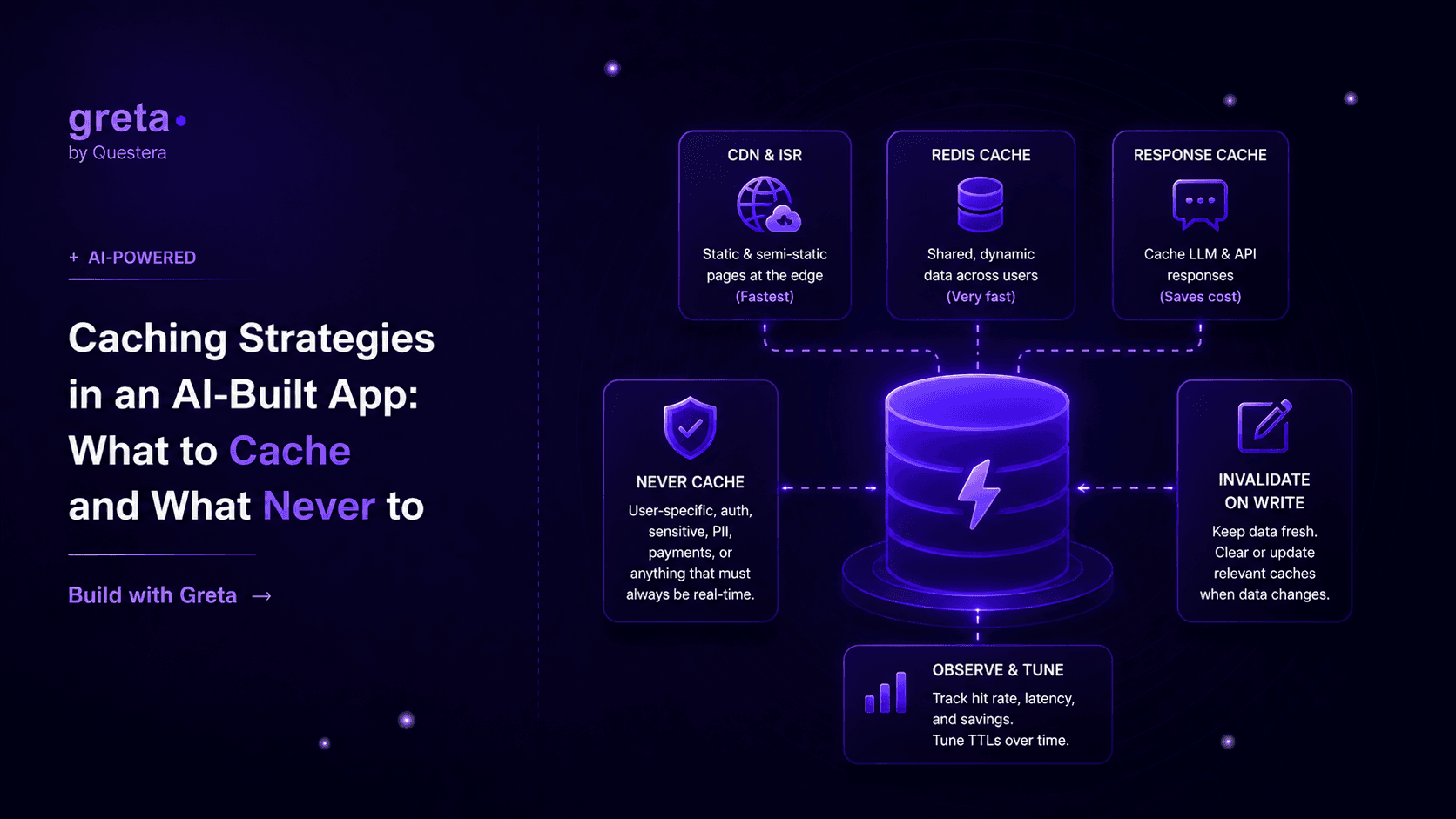
Cache anything that's expensive to compute and slow to go stale — rendered marketing pages, third-party API responses, AI-generated summaries of unchanged data. Never cache anything tied to a specific user's live state, like a cart total or an account balance, without an invalidation path you trust. Most apps need three layers, not one: the CDN in front of static pages, an in-memory or Redis layer for shared data, and short-lived response caching for anything that calls an LLM.
The bug that looks like a feature
A team ships an AI-built app, it's fast in testing, and then two weeks after launch someone opens a support ticket that says "my dashboard shows yesterday's numbers." Nobody touched the dashboard code. What happened is someone else, trying to make the app feel faster under load, wrapped a database query in a five-minute cache and called it done.
That's not a caching bug. That's a missing invalidation strategy wearing a caching bug's clothes.
Caching is easy to add and easy to get wrong in a way that doesn't show up until real traffic hits it. The mistake isn't caching too little — most apps under-cache and pay for it in database load. The mistake is caching without deciding, in advance, exactly when that cached value stops being true.
Three questions before you cache anything
Ask these before reaching for Redis: how often does this data actually change, how bad is it if a user sees a slightly stale version, and do you have a specific event that should clear the cache? If you can't answer the third one, you don't have a caching strategy yet — you have a timer, and timers are how "yesterday's numbers" bugs get made.
The three layers that cover almost everything
CDN / edge caching handles anything that looks the same for every visitor — marketing pages, blog posts, docs. Next.js does this well with static generation and Incremental Static Regeneration, where a page is built once, served from the edge, and quietly rebuilt in the background on a schedule you set:
export const revalidate = 3600; // rebuild this page at most once an hour
That one line means a page like a pricing page or a blog post gets served instantly from a CDN edge node, and Next.js handles regenerating it in the background without a user ever waiting on the rebuild.
In-memory / Redis caching is for data that's shared across users but too expensive to recompute per request — an aggregated stats query, a list of active promotions, a third-party API response you're not allowed to hammer on every page load. Redis with a TTL is the standard tool here, and the TTL should map to how fast the underlying data actually changes, not a round number that felt safe.
Response caching for AI calls is the layer most teams skip and then wish they hadn't. If ten users ask an LLM the same question, or your app re-summarizes the same document twice within an hour, you're paying full LLM cost for an answer you already have sitting in memory. Hashing the input and caching the output for a short window — even five minutes — cuts real cost on any feature with repeatable inputs.
Where invalidation actually goes wrong
The failure mode is almost always the same: a write happens somewhere in the app, and nothing tells the cache about it. A user updates their profile, the cached version of their profile page keeps serving the old name for the next fifteen minutes, and now there's a support ticket. The fix isn't a shorter TTL — a shorter TTL just means the bug happens less often, not that it's gone. The fix is invalidating on write: when the update handler runs, it clears or updates the specific cache key that update affects, the same request that changed the data is responsible for telling the cache it changed.
Cache keys that include exactly what makes a value unique — user ID, resource ID, a version number — make this tractable. A cache key like stats:workspace:{id} is easy to invalidate on write. A single shared key for "all workspace stats" is not, because you can't clear one workspace's entry without guessing whether it's safe to clear everyone else's too.
Got an idea? Build it now!
Just start with a simple prompt. No coding required: Greta.sh turns your idea into a working app in minutes.
What never belongs in a shared cache
Account balances, permission checks, anything that gates access to paid content, and per-request personalization shouldn't sit behind a cache that could serve one user's data to another, or serve a stale "yes you're allowed" after access was revoked. If the cost of being wrong is a security or billing problem, skip the cache or scope it so tightly to one user and one session that a mistake can't leak across accounts.
A comparison: caching layers and what they're for
| Layer | Good for | TTL / invalidation | Risk if wrong |
|---|---|---|---|
| CDN / ISR | Marketing pages, blog posts, public docs | Minutes to hours, or on-demand revalidate | Stale public content, low stakes |
| Redis / in-memory | Shared aggregates, third-party API responses | Seconds to minutes, invalidate on write | Wrong dashboard numbers, support tickets |
| AI response cache | Repeated identical prompts, re-summarization | Minutes, keyed on input hash | Stale AI output, rarely dangerous |
| No cache | Balances, permissions, per-user secrets | N/A — always read live | Security or billing exposure |
Where this lives in a Greta.sh-built app
A Greta.sh-scaffolded Next.js app gets ISR for free on any statically generatable page — that's the first caching win most projects never have to think about. For the Redis layer, it sits next to the same infrastructure covered in rate limiting and abuse prevention, since a rate limiter and a cache both live comfortably in the same Redis instance, just with different key prefixes and different TTLs.
The invalidate-on-write pattern also pairs naturally with running background jobs and scheduled tasks — if a write triggers an expensive recompute rather than a simple cache clear, that recompute belongs in a queued job, not inline in the request that triggered it. Keep the cache-clearing fast and synchronous; push the expensive rebuild to the background.
Got an idea? Build it now!
Just start with a simple prompt. No coding required: Greta.sh turns your idea into a working app in minutes.
FAQ
Should I cache database queries by default? No — cache the ones you've actually seen show up slow or repeated in your logs. Caching everything up front adds invalidation surface area for queries that were never the bottleneck.
Is a five-minute TTL a safe default? It's a safe-feeling default, which isn't the same thing. Pick the TTL based on how often the underlying data changes and how bad a stale read is, then add invalidate-on-write for anything where staleness would actually confuse a user.
Do I need Redis for a small app? Not always. In-memory caching inside a single server process works fine until you have more than one server instance running, at which point each instance has its own cache and users get inconsistent results depending on which one answers their request. Redis fixes that by giving every instance the same shared cache.
Can I cache AI-generated content long-term? Yes, if the input that produced it hasn't changed and you're not worried about the model producing a better answer next time you'd ask. Treat it like any other cached computation — key it on the input, invalidate when the input changes.
Closing
Caching isn't one decision, it's three or four small ones layered on top of each other, and the layer that causes real damage is almost never the CDN — it's the shared cache nobody wired an invalidation path into. Add caching where the data is genuinely expensive and slow-changing, skip it where being wrong costs someone money or access, and always know the one event that should clear each key before you ship it.